Matching Talent:
Pair People Personality and Company Culture
In this post I will take you through the creation of my Final Graphic Design Project for COM561. I will explain the user-centered design process and will discuss the inspiration and imagery significance within this flyer advertisement.
Design Process
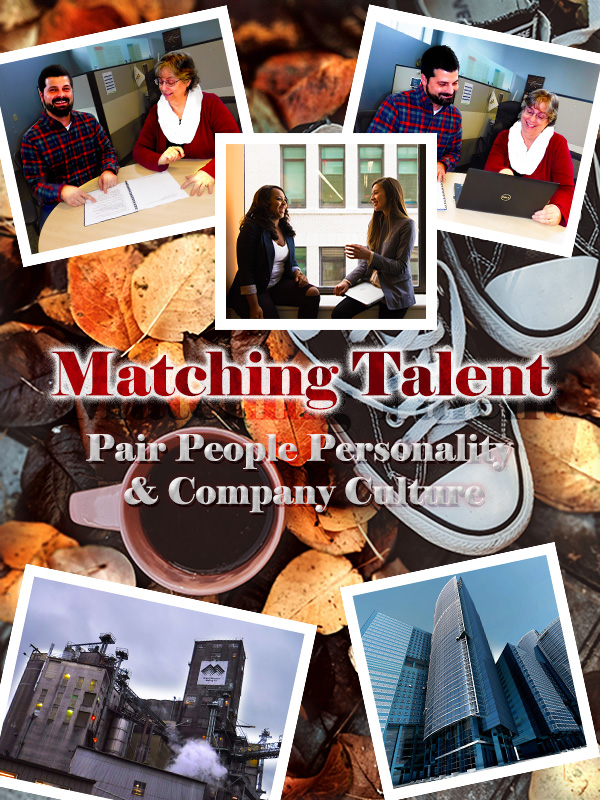
During the design process, I scrapped several drafts. The nice part about this trial and error was that it created an opportunity to become more familiar with Adobe Photoshop along with effects we reviewed during the class tutorials. I experimented with levels, adding strokes of various thickness, 3D text and manipulated vibrance/ color balance/ hue/ saturation within the “black and white cookie.” When I encountered a design challenge, I would either refer back to our class tutorials, search for other available tutorials or simply explore options in Adobe until I found something that looked right.
The First Layer

I found the background layer photo from Pexels free images. This photo was selected because the Converse are a nice ideogram to “pairing people” to companies. The coffee cup made me think of indulging in an afternoon “pick me up” in the workplace. The fall leaves I thought were a nice color contrast to the people pictures I had chosen, along with facilitating the idea of change (such as a change in career).
This layer was cropped, and I added a nondestructive adjustment layer to the leaves.
People and Places Pictures
Below you can see the original raw photos. For some of the images the contrast was changed through adding nondestructive adjustment layers, such as we did in the cougar cubs’ tutorial. Other images were brightened or cropped before embedding them into the graphic.
Once added, each image was resized via free transform and given a stroke border of 11px to frame it. During the revision phase, the stroke border was changed to 85% opacity to create slight transparency and provide transition from the background layer. All images are angled at 12 degrees or -12 degrees. Having consistency in the stroke border and the angles was done to create symmetry and similarity in the design.

To create better balance and order in the final design, I removed one of the people pictures and rearranged the photos so that each vertical half of the graphic has one people photo and one workplace photo. Through this edit, I still considered the Rule of Thirds and attempted to leverage it, while placing the photos in a way as to frame the title.
Playing with Text
The text was altered A LOT. After the peer reviews, I made even more revisions. I changed the positioning of the title to be more centered vertically and moved the phrase to fill what was previously empty space.
I implemented the advice to capitalize all letters in “Matching Talent.” The text color remains the same. The leaf pattern overlay is now 49% opacity, and the outer glow was changed to create a somewhat dimmed white underlay to the title. The outer glow opacity was changed to 73% with 20% noise; the Elements technique is now “Softer,” and the spread is 15% with a size of 35%. This is how the faded white banner behind “Matching Talent” was created. The outer glow was changed this way in attempt to create additional depth and soften the text while still keeping it a focal point.
The phrase “Pair People Personality & Company Culture” was changed a few ways. The font style and size were edited, and the color is now an orange with a Bevel & Emboss shading of brown and red at 100% opacity paired with a gloss contour. This along with the leaf texture (35% scale and –22% depth) and a 44% opacity yellow overlay drop shadow give an illusion of fall leaves within the text without becoming invisible to the background.
To further separate this text from the background layer, I added a complimentary blue outer glow. The opacity for this is 85% with a “Softer” Elements technique and a spread of 35% with a size of 20%. This helps the text “pop” without being overwhelming to the rest of the design. I also like this effect because it looks like the phrasing could be floating in a water puddle among the leaves.
With these changes I think there is better balance and similarity to the imagery.
Design Interpretation
Each element of this graphic was selected with the intent of relating to this blog’s topic. Matching Talent focuses on exploring recruitment methods to match the right personalities to the right company cultures, hence Pairing People & Cultures.
The First Layer
The pair of Converse shoes are a play on words. Attempting to pair people and companies just as you might have a matching pair of tennis shoes: they fit so well together they are a MATCH. You wouldn’t wear a Converse on one foot and a Romeo on the other foot, would you?
The People Pictures
One of these photos is of my co-workers; they were gracious enough to let me photograph them for this project. This photo and the photo from Pexel, to me depict people who fit into a company’s culture well. They seem to be comfortable in their environment and are enjoying the interactions with their peers.
Pairing people to companies is not just about the talent match for the company; it is finding the right fit that suits a candidate’s desires and needs. To me, this tone is displayed in these photos.
The Buildings
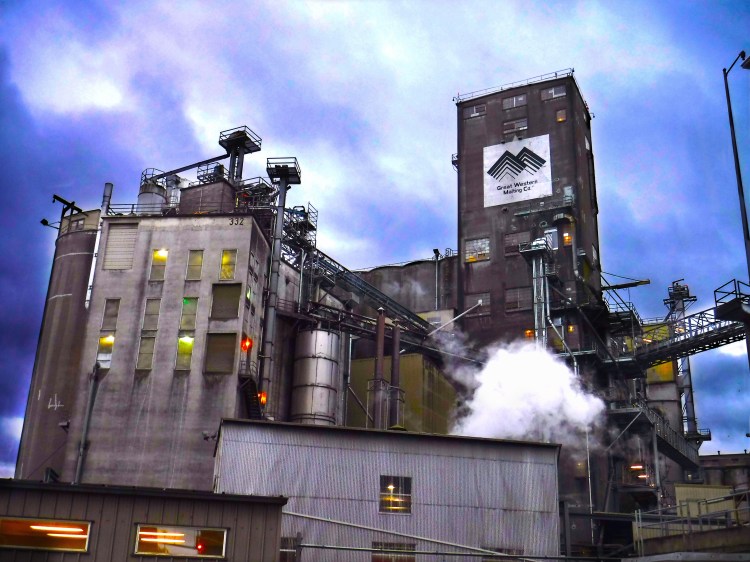
The building on the lower left-hand corner of this graphic is a picture of my company’s malt manufacturing plant. This building is almost one hundred years old, made out of cement, and probably in need of some “R&R.” To have a contrast of industry, structure and working environment, I selected the skyscraper picture (featured in the upper left- hand corner of the final graphic). I wanted to show two different extremes relating to work environments: scenario one might be considered more “blue collar” while picture two might be considered more “executive.” The idea being that every person has a different preferred working environment.
Final Review
With no further adieu… here is the final version of my Graphic Design Project:

A blog to explore how to Pair People Personality & Company Culture. What is the right fit for you?
Image Citations
Creator Name Unknown. “Glass Building in Worm’s Eye Photography.” Pexels. 07 January 2020. https://www.pexels.com/photo/architecture-blue-sky-buildings-business-290275/
Miller, Valeriia. “High Angle Photo of Converse All Start Sneakers Near Cup of Coffee.” Pexels. 29 October 2019. https://www.pexels.com/photo/high-angle-photo-of-converse-all-star-sneakers-near-cup-of-coffee-3146180/
Morillo, Christina. “Woman in Gray Formal Coat Sitting Near Black Full-glass Panel Window.” 22 June 2019. https://www.pexels.com/photo/woman-in-gray-formal-coat-sitting-near-black-full-glass-panel-window-1181562/
ShonEjai. “Closeup Photo of Brown Brick Wall” 10 July 2018. https://www.pexels.com/photo/closeup-photo-of-brown-brick-wall-1227511/
 Matching Talent